Download Link 1
Download Link 2
This Apk is for Android Phone only, cant be use for iphone etc. Its suitable for project such as mobile robot, robot car, turn on appliances light motor etc.
How to install third-party apps without the Google Play Store
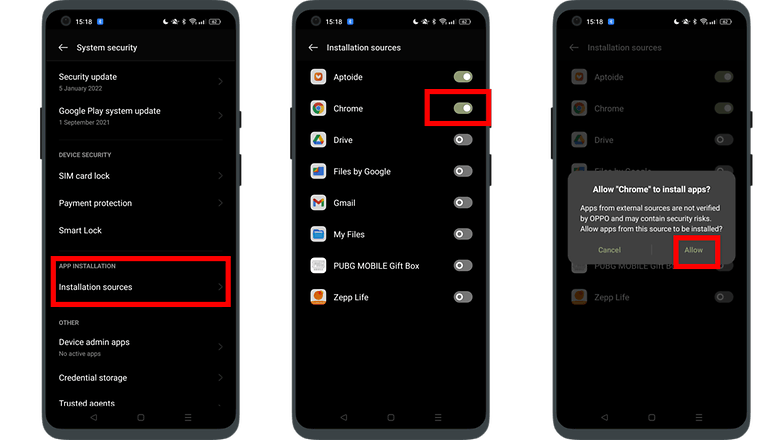
Go to Settings.
Find the Security & privacy option and tap on it.
Scroll down and look for install from unknown apps. If it’s not there, try under ‘more’.
You should be presented with a list of apps. Find your browser – Chrome, for example.
Tap on it and then select Allow from this source.
If the above path doesn’t work for you, try the following:
Head to Settings.
Go to Apps & notifications and then select configure apps.
Scroll down. Find and tap advanced options or special app access.
Scroll to the bottom of the special app access menu, where you can find the Install unknown apps option.
Find your browser, (e.g. Chrome), tap it and select Allow from this source.
One Response