First of all, download Arduino Nano Library for Proteus files, by clicking the above button:
We have downloaded Proteus Library file in Step 1 and now we need to install it in Proteus software. For installation, we don’t need to execute any file, instead we simply need to copy & paste these Proteus Library Files in the library folder of Proteus.
- If you are using Windows 7, 8 or 10, normally Proteus software is installed in the Program File (x86) folder, but it could be in Program File folder as well.
- So, go to your C drive and then in both of these Program File folders, search for Labcenter Electronics.
- This Labcenter Electronics folder is automatically generated by Proteus setup.
- If you have installed Proteus 7 or Proteus 8 or both, they will be present here. Here’s a screenshot of my Labcenter Electronics folder:
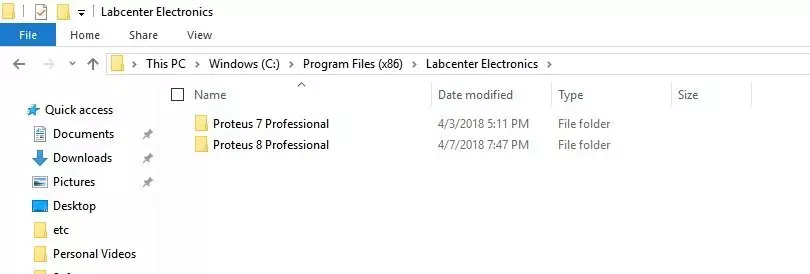
- Once you are here, now if you want to add Library in Proteus 8, click on Proteus 8 software as shown in below figure:
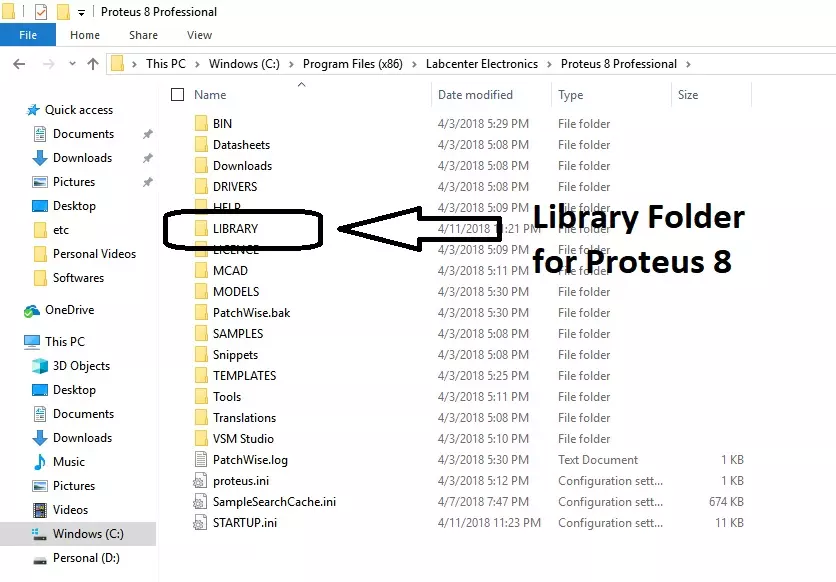
- You can see Library folder in above image, so simply paste your Proteus Library files in this Library folder.
- Here’s the complete link of Proteus 8 Library folder: C:\Program Files (x86)\Labcenter Electronics\Proteus 8 Professional\LIBRARY.
- In some Proteus 8 Installations, you may find the Library folder at this link: C:\ProgramData\Labcenter Electronics\Proteus 8 Professional\LIBRARY.
- After adding these Proteus Library files, restart your Proteus software. You have to restart it otherwise it won’t update its components’ database.